Several weeks ago I was contacted by a group in the Madison area that is comprised of people who head up PMOs. Currently the group has 10 people.
We meet for 90 minutes every 2 months and address one Project Management topic. At this months meeting we talked about and had examples of what we are using for monthly status reports. The common item we all had was executive reports using stop light colors (red = a problem). Some companies were utilizing an elaborate dash board system while others kept it simple using Excel to monitor their portfolios.
I think this is a great venue for the leaders of PMO's to come together to talk about their tools and techniques they are using in their organization and it may give the attendees some new tools to go home with.
Sunday, April 27, 2008


Sunday, April 13, 2008
The Creep in your project...
As Project Managers we all try to stop the Creep in our projects. What is this Creep you may ask? Well, it is scope creep!
How can we limit it?
- Determine all stakeholders and get their input into the project at the start of the project. This is key to defining the scope of the project.
- Make sure all the stakeholders review and agree to the scope.
- Break down the WBS far enough to cover all the items in the scope.
- Have a change control process and make sure your project team members understand it. When a possible change comes in make sure you investigate it (is it really necessary?), come up with options, and then present it to the change control review board.
If you keep this in mind for your next project you may just keep Creep out or at least have a means for controlling it.
Friday, April 04, 2008
The Project Starts Tomorrow…
Have you ever been in a situation where a project happens to drop in your lap and it needs to start like yesterday? If so there are 2 key items you need to get it going.
They are: a Project Charter and a High Level WBS.
Many times for small internal projects (my definition of small is less then 8 stakeholders, 15-20 items on the WBS, no budget and a project duration of 8 or less weeks) I put together a Project Charter, but also include things in it which you would typically find in the Project Plan. Like a list of upfront risks, and the communication plan.
Next I take my High Level WBS (which I created using historical information and having short meetings with the stakeholders) and put it into Visio using their timeline template.
Example:
Then it is time for the kick-off meeting where we review the scope, the Visio timeline, update the timeline, discuss the risks and touch upon the communication plan.
The Project Charter and WBS are the 2 key items that every project, big or small, needs to have.
Sunday, March 30, 2008
For the on the go Project Manager...
If you are pressed for time to keep up on new PM trends or brushing up on PM methodologies I would suggest listening to PM podcasts.
Simply download the podcast you wish to hear to your ipod (or other MP3 player) and listen to it when you have time (at the gym, on the plane, in the car, on the subway...).
My personal favorite is:
http://www.thepmpodcast.com/
This site was created by Cornelius Fichtner who posts a new podcast every week. Typically he brings on a PM from different industries and they discuss different topics in project management. It is alway great to hear others talk about the success and pitfalls in their projects.
A second podcast site is:
http://www.iil.com/webinars/
This is another great site because they offer FREE PDU's if you listen to several of their podcasts.
As technology changes we must adapt as project managers and embrace new methods to learn and teach what we learn to others.
Simply download the podcast you wish to hear to your ipod (or other MP3 player) and listen to it when you have time (at the gym, on the plane, in the car, on the subway...).
My personal favorite is:
http://www.thepmpodcast.com/
This site was created by Cornelius Fichtner who posts a new podcast every week. Typically he brings on a PM from different industries and they discuss different topics in project management. It is alway great to hear others talk about the success and pitfalls in their projects.
A second podcast site is:
http://www.iil.com/webinars/
This is another great site because they offer FREE PDU's if you listen to several of their podcasts.
As technology changes we must adapt as project managers and embrace new methods to learn and teach what we learn to others.
Saturday, March 22, 2008
How to keep Project Managers
As I noted in my post on the 08Mar2008 there is a new breed of project manager out there that is mainly made up of Gen Y and Gen X individuals who are looking for more in a company. Long gone are the days of an employee being dedicated to one employer for their entire career. So what can we do to try to keep them for as long as possible? This new breed of Project Manager is looking for: mentoring, training, a good work environment, different types of projects, flexible schedules and appropriate salaries.
Mentoring – The managers and leaders of the PMO are responsible for having a system in place to help their project managers build their skills, point out where they are lacking so they can continue to grow with their company. Examples of this include sitting in on meetings the PM is conducting and critiquing them. Also, auditing their projects to determine if they are complying with your PMO policies, procedures and methodologies. If we do not point out and correct their flaws their projects and your company may be at risk.
Training – Whether your PMO has an internal trainer or you send your staff off-site to receive training it is key to keep your staff fresh and current with Project Management methodologies and trends. Within my own PMO I have Executive buy-in on a yearly budget which includes training classes and events I would like to send my staff to. I also keep an eye open for websites with PM related articles and Pod Casts which I send to them the first week of every month (they now anticipate this and some of my project managers stop by my office after reviewing the article to discuss it with me).
Once you have mentoring and training in place you need to have a career development plan for your staff. By setting bench marks for staff you give them a goal to focus on to move to the next level (possible job titles may be: Project Coordinator -> Associate Project Manager -> Project Manager –> Senior Project Manager -> Manager in the PMO -> Portfolio Manager).
Good Work Environment - Who doesn’t want this? This is an important key to attracting and retaining great staff. If your company has a high turn over rate do you know why? To determine if your company has a toxic work environment you can conduct an anonymous survey (link to freeonlinesurvery.com) and conduct exit interviews with staff that are moving on. Another option is to bring in a consultant to develop a report based on staff interviews. With these 2 key elements you can determine where your company needs to improve.
Project Mix-up: Project Managers want the opportunity to manage different types of projects. This helps to challenge them instead of taking on the same type of project over and over again. An example of this is to give your staff process improvement projects.
Flexible Work Schedules – Many companies are adopting these practices as technology changes the way we communicate and as our projects spread outside our company’s time zone. This change is more prevalent in industry then it is in academia which is still heavily focused on the butt in the seat time.
Do your employees have a good work life balance? We give our staff vacation time to spend time with their families and to allow them to just let their hair down. If it is a requirement that your staff must have access to email and cell phones at all times, you must give them the tools to keep in touch with their teams. I’ve worked with companies before where the project managers are required to keep in touch at all times, yet they did not provide the right tools (laptop, high speed internet, cell phone/blackberry) to do this. This, again, is part of the work environment. That is, if you give your staff the tools they need to do their jobs they reduce the risk of falling behind on their projects (big benefit at a low cost).
Appropriate Salaries - If your company does not stay competitive with companies within the region how can you expect to attract quality employees and retain them? At the same time you cannot throw money at your staff and expect them to be happy if you do not have any of the items outlined above in place.
As Project Management continues to infiltrate more and more companies creating more and more PM related jobs, it is key for companies to have a plan for their staff (PMO or not). If they don’t, their new hires will spend time looking out the window for the next big fish to bite so they can move on.

Friday, March 14, 2008
Lessons Learned Survey:
The standard steps for the lessons learned process are:
- Identify comments and recommendations that can be valuable for future projects.
- Document and share your findings.
- Analyze and organize the lessons for later application
- Store findings in a repository.
- Retrieve the lessons for use on current projects.
So as Project Managers how do we crack these team members shells to get them to express their thoughts?
A survey. Typically at the end of my lesson learned meetings I pass out pads of post it notes to each member and ask them to write down a survey question and some possible answers. Many times this involvement lets the team member ask their question.
Ok, I have the questions for the survey now what? I use http://freeonlinesurveys.com/
It is easy to use and allows the data to be exported to Excel. Another reason why I like this, is that it allows the survey taker to be anonymous and allows them to write in comments.
Finally once we have the survey and the minutes from the meeting and the executives have read them now what?
I have worked with large and small organizations and typically the large ones have a formal database in which these items can be put into. And smaller organizations typically have a central location for these documents which will be used on current project and future projects.
Hopefully as your organization matures the lessons learned will be incorporated into everyday procedures. If they do then you know the process is effective and your organization is willing to change to become better!
Saturday, March 08, 2008
How can an organization use a Wiki?
Communication is changing. As the Baby Boomers retire and Gen-Y and Gen-X take over, new forms of communication will be created (remember 90% of the PM job is communication). The communication choices of these generations have moved to message forums, blogs, emails, text messaging and even wikis. Gen Y and X are also focused on working for companies where they are valued and also enjoy having an opportunity to work with their friends.
As communication changes our organizations must too. So how can we use wikis?
A wiki is software that allows users to easily create, edit, and link information together. Wikis are often used to create collaborative websites and to power community websites.
Wiki software can either be purchased for your control within your LAN or you can find free wiki sites to host your wiki.
So what are some example of how a company could use a wiki?
Process Improvement. Creating a wiki that will allow the free flow of ideas on how to improve your organization from input from your staff.
Project Communication. If you can create a Word document you can add content to a wiki. Your Project Team can have their own section to update the team. And the PM can include links to the common projects documents (WBS, PM communication plan, Timeline...).
Event Coordination. Lay out the frame-work and let the staff fill it in. This will allow the team to see the big picture of the event and gets them involved.
For more ideas and examples click on the following link.
As communication changes our organizations must too. So how can we use wikis?
A wiki is software that allows users to easily create, edit, and link information together. Wikis are often used to create collaborative websites and to power community websites.
Wiki software can either be purchased for your control within your LAN or you can find free wiki sites to host your wiki.
So what are some example of how a company could use a wiki?
Process Improvement. Creating a wiki that will allow the free flow of ideas on how to improve your organization from input from your staff.
Project Communication. If you can create a Word document you can add content to a wiki. Your Project Team can have their own section to update the team. And the PM can include links to the common projects documents (WBS, PM communication plan, Timeline...).
Event Coordination. Lay out the frame-work and let the staff fill it in. This will allow the team to see the big picture of the event and gets them involved.
For more ideas and examples click on the following link.
Saturday, March 01, 2008
Action Logs:
Many Project Mangers make the fatal mistake of only including their project actions within the meeting minutes. Why is this fatal? Because, most team members will never open the minutes. So as a PM how do we get the information out to our teams?
I've worked with organizations that have very elaborate project dashboards (website) that has this built into it. The dashboard is an excellent tool since it will allow you to view actions and project information across multiple projects. The downside of the dashboard is the cost to build or purchase and maintain it.
I've also worked with PMs who send out actions as tasks in Outlook (not my favorite method).
For organizations that are smaller I suggest creating a simple Excel file like the image below:
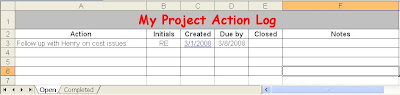
Within this file I create 2 tabs. One for open actions and one for completed actions. The information in the completed tab should be added to the lessons learned meeting report to capture it for historical reasons.
The great thing about this method is that the PM can copy and paste the table (or turn on the filters and filter for certain staff members actions) into the body of an email. By doing this the team member will see it right when they open the email. If the team member then wants to review the minutes for the meeting in which the action came up in they would click on the created date, which has a hyperlink to the minutes. I have found that this is a very easy and cost effective way to ask for updates on actions.
So, depending on the size of your organization and the number of stake holders on your project team an action log built using Excel may be the trick you need to help keep your projects on track.
I've worked with organizations that have very elaborate project dashboards (website) that has this built into it. The dashboard is an excellent tool since it will allow you to view actions and project information across multiple projects. The downside of the dashboard is the cost to build or purchase and maintain it.
I've also worked with PMs who send out actions as tasks in Outlook (not my favorite method).
For organizations that are smaller I suggest creating a simple Excel file like the image below:

Within this file I create 2 tabs. One for open actions and one for completed actions. The information in the completed tab should be added to the lessons learned meeting report to capture it for historical reasons.
The great thing about this method is that the PM can copy and paste the table (or turn on the filters and filter for certain staff members actions) into the body of an email. By doing this the team member will see it right when they open the email. If the team member then wants to review the minutes for the meeting in which the action came up in they would click on the created date, which has a hyperlink to the minutes. I have found that this is a very easy and cost effective way to ask for updates on actions.
So, depending on the size of your organization and the number of stake holders on your project team an action log built using Excel may be the trick you need to help keep your projects on track.
Sunday, February 24, 2008
PM Templates?
Many times the "sometimes" Project Manager has to come up with their own templates to help manage their projects. There are many websites that offer templates but the one I recommend to others is a site developed by UW Madison. The reason why I like it is that it offers templates and examples of the templates in use.
Check it out at:http://www.pma.doit.wisc.edu/templates.html
Check it out at:http://www.pma.doit.wisc.edu/templates.html
Sunday, February 17, 2008
Frozen Team Members...
As I look outside today at the ice covered roads and trees it reminds me of a project team member I had once (that is frozen when asked a question).
Typically mid week I'll do the walk around and chat with my Team Members (or give them a call if they are off site) and ask for a few updates on their weekly project tasks. I had one team member that was never interested in chatting with me to give me an update on his tasks. So I tried something different. During the days I would do my walk around I would email him with a few questions and I asked him for a few updates. Within a few hours he would respond back with an excellent update.
After a few weeks of doing this with him I tried a slightly different approach. I still sent out the email and waited for a response. The next thing I mixed in was following up with him with a few more verbal questions which were related to the original question. When I did it, he was now ready for a discussion on the issues since I primed him with my email.
What I learned from this is that as a PM you must be flexible in your communication styles. Today I see so many PMs look to ask their questions and manage their projects via email. Why? The typical reason they give is documentation. That is fine, but is it still possible to do this face to face or with a phone call. How? After your discussion document it in an email and then send it to the person you spoke with.
Remember 90% of Project Management is communication! You must master all forms of communication and be flexible with your team members to be an effective Project Manager.
Typically mid week I'll do the walk around and chat with my Team Members (or give them a call if they are off site) and ask for a few updates on their weekly project tasks. I had one team member that was never interested in chatting with me to give me an update on his tasks. So I tried something different. During the days I would do my walk around I would email him with a few questions and I asked him for a few updates. Within a few hours he would respond back with an excellent update.
After a few weeks of doing this with him I tried a slightly different approach. I still sent out the email and waited for a response. The next thing I mixed in was following up with him with a few more verbal questions which were related to the original question. When I did it, he was now ready for a discussion on the issues since I primed him with my email.
What I learned from this is that as a PM you must be flexible in your communication styles. Today I see so many PMs look to ask their questions and manage their projects via email. Why? The typical reason they give is documentation. That is fine, but is it still possible to do this face to face or with a phone call. How? After your discussion document it in an email and then send it to the person you spoke with.
Remember 90% of Project Management is communication! You must master all forms of communication and be flexible with your team members to be an effective Project Manager.
Monday, February 11, 2008
Project Closeout...
When closing a project don't forget to formally closeout all contracts. Many Project Managers forget this step and find the project never ends since the sponsor keeps requesting additional input even after they have received the final product (common with clinical trials where the sponsor request different data mining efforts).
When writing up the closeout document don't forget to include a statement stating that additional maintenance may be completed on a fee for service basis. This will protect you and your organization.
When writing up the closeout document don't forget to include a statement stating that additional maintenance may be completed on a fee for service basis. This will protect you and your organization.
Wednesday, February 06, 2008
My Team Members cannot see my project documents
Do you have project team members that do not have Microsoft Project on their computers? If so kadonk.com has the fix for you! Their freeware application will allow users to view your Microsoft Project files without having to pay expensive licensing fees.
Subscribe to:
Posts (Atom)